Friday, June 16, 2023

Free Download Honda HDS 3.015.012 Software

 [June 2023] New version Honda HDS (Honda Diagnostic System) software version 3.105.012 download free, no password.


The i-HDS software is full of functions and features all while giving the user a layout somewhat familiar to the legacy HDS software. i-HDS supports vehicle models starting from the 2017 model year, for all Full Model Changes and new models.


Honda HDS 3.015.012 + iHDS +J2534 ECU Rewrite [2023.06] 

Download Link

Version

HDS 3.015.012

iHDS

J2534 Rewrite

Immobilizer Setup Tool

Free Download Honda HDS 3.015.012 Software

Language: English

Year/Release Date: 06.2023

Operating system: Windows 7, Windows 8, Windows 10


Support diagnostic interface: vxdiag vcx se series, vcx plus/vcx doip series, godiag j2534 etc

Honda HIM double board has not been tested.

i-HDS support J2534 passthru devices, Other devices are free to test by your side.


How to Install Honda HDS 3.105 software?

1. Install HDS setup

2. Install iHDS setup

3. Install J2534 Rewrite setup

4. Install ImmobilizerSetup Tool

5. Install device driver (install vx manager if using vxdiag scanners)

6. Run iHDS

Tuesday, June 6, 2023

Honda HDS Reset 2006 S2KI Airbag SRS

Question: I need to reset the airbag light in my Honda s2ki MY06. Any idea of what scanner I need for that? I don't really want to go to the dealership.


Answer:

You probably need Honda HDS software and an OBD-II dongle. I purchased those things late last year with success to re-calibrate the passenger airbag sensor in my 06. It was < $110.

You may be able to clear SRS codes with a normal OBD-II machine but I'm not sure. To access all of the Honda software BS in the 06+, you need Honda HDS. You're probably going to pay that much if you go to a Honda dealership to clear it anyways. 


HDS software installed and I ran the Seat Weight Sensor (SWS) Initialization process and everything is working as it came from the factory. SRS light on dash is off. Seat belt light comes on the dash if I sit in the pass. seat without buckling my OEM receptacle. Pass. Airbag "Off" light displays when I buckle the seatbelt and have no weight in the seat. "Off" light goes off once I sit in the seat. So happy it all worked.

Onto the Ballade rail. First of all, I'm stoked they make it and it's a good product that could use some fine tuning.
  • Pros
    • First in, best dressed as the only product currently available for side mount seats with weight sensors
    • OEM Weight sensors work!
    • OEM sliders are smooth
    • Fits great. Idk if it's Pole Position specific but it bolted to the seats perfectly and lined up great once put in the car. Yes, it's OEM rails but they're 2 pieces and I was worried it may be difficult. Very easy and great fit.
    • You re-use your factory SRS box under the passenger seat. I later learned that you actually have to and even with the HDS, the documentation indicates you can't use one out of a different car. People who sell their OEM seats should know this.
    • Ballade did a great job getting the little SRS box/bracket as low as possible. I think it's lower than OEM and will allow a bucket to sit pretty low without interfering. It's positioned the best it can be.
    • For parts, pretty much same as my PCI rail. Ballade also includes nylon washers/spacers for the seat's side mount to protect it from the metal rails.
  • Cons
    • Seat belt receptacle bracket on trans tunnel side is not located where it should be. It is located forwards of the harness holes in the seat. It should be back further for ideal safety. I'm not a safety engineer or knowledgeable enough to comment on how good/bad this is. It looks and feels fine in the car and I think it works but it's not ideal. I think this may be because the passenger trans tunnel sticks out further as it goes back. I'm not sure there would be enough room for a belt mount properly far back.
    • Rails could use some finishing. Ballade removes some rivets from the OEM rails to bolt on their own side brackets. That space left some bare metal. I shared feedback with Ballade and they claimed that's how it is from the factory. That is likely true but I did take mine apart and sand/paint them.
    • I had to drill a hole in my passenger seat belt receptacle mount to allow for mounting the slider's cable. I'm not sure if this is specific to mine or if it is generally an oversight of the product. The back story is that my rails did not initially ship with the seat belt receptacle mount on the trans tunnel side. I emailed Ballade and they had one shipped out to me quickly. Maybe when they do assembly, they typically drill it themselves. Not sure, but I had to do it myself.

The finishing stuff is not a huge deal but it is an expensive product that I think could be better refined. The seat belt receptacle mount is really the only part that has not been easily remedied. I'm not sure if that's oversight or if it's not possible because of the shape of the trans tunnel.

It works! Paying for HDS software + a HIM cable was probably cheaper ($110) than going to a dealer. I also am not confident I could go to a dealer and demand they run the SWS initialization without them doing their own assessment.

Wednesday, May 3, 2023

Free Download Honda IHDS-ECU Package 07.2021

 Free download Honda Diagnostics Reprogramming IHDS-ECU Package 07.2021.

Honda HDS 3.104.026+ iHDS 1.006 + J2534 Rewrite


Software:
Installer 1.006.023
i-HDS software 1.006.029
HDS software:3.104.026

Immobilizer Setup Tool 1.3.12

J2534Reprogramming DBVersion 04/15/2021

Year/Release Date: 07.2021


Multi-language

OS Support: Windows 7 SP1/8/10 (x64 bit)

Compatible VCI: DST-i, GNA600, VXDIAG HondaHonda HDS HIM double-board, SM2 Pro USB


Software display:

Free Download Honda IHDS-ECU Package 07.2021 1

Free Download Honda IHDS-ECU Package 07.2021 2

Free Download Honda IHDS-ECU Package 07.2021 3

Free Download Honda IHDS-ECU Package 07.2021 4


Thursday, August 4, 2022

Download, Install and update Honda iHDS

 Honda and Acura have a platform that you have to buy subscription from it.  After purchase subscription and download software, you can use a Honda J2534 passthru device to do anything you want.


Honda HDS vs iHDS


Part I: How to Buy it, Download it and Activate iHDS?

So what you need to do first you have to have internet.

You are gonna internet explorer you don’t go by google because when you pay the bill for the subscription it will not go through here.

You can write Honda Tech Info, then you click you will get this Honda tech info on the express, click on Login

Already have your login in, so you click OK

Download, Install and update Honda iHDS 1

Download, Install and update Honda iHDS 2

Download, Install and update Honda iHDS 3

Download, Install and update Honda iHDS 4

Now here you click to get the subscription. You’re gonna scroll down.

You choose 45$ for one day, $200 for 30 days or $1,800 for 365 days.

Download, Install and update Honda iHDS 5

Download, Install and update Honda iHDS 6

Download, Install and update Honda iHDS 7

Download, Install and update Honda iHDS 8

You have got a login, you want to pay by Paypal or you want to pay by Credit car.

Buy now after you put your information.  You have to display also what language whether you need French Canadian French.

You have to put the language. They have a disclaimer you have to accept the disclaimer agree.


Honda Acura Software Installation And Subscription: How To Install it (Window 10 and Up)

If you want to download the software, you are going to click here if they ask to put the password for registration.

There is also a software installation instruction pdf.

Download, Install and update Honda iHDS 9

Download, Install and update Honda iHDS 10

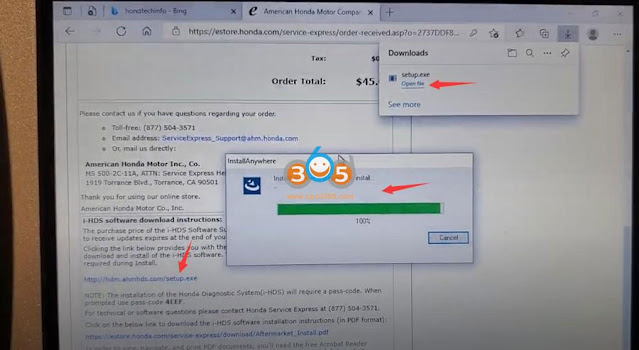
You will download Honda Download Manager on your desktop, install the Download Manager.exe
Download, Install and update Honda iHDS 11

Download, Install and update Honda iHDS 12

Download, Install and update Honda iHDS 13

Download, Install and update Honda iHDS 14

Download, Install and update Honda iHDS 15

Download, Install and update Honda iHDS 16

Then run Download Manager

Download, Install and update Honda iHDS 17

Download, Install and update Honda iHDS 18

Those are the software that are going to be updated and downloaded

you can click Honda Donwload Manager tool to see what is going on with the downloading and upgrade

It will give you all the steps when you download for the first time.

After that you can use a passthru device to do anything you want.


Part II: Set up J2534 Passthru, Diagnose and Program Honda/Acura with iHDS

Run iHDS Diagnostic System software

Select a J2534 Passthru: DST-i, DST-nano, GNA600, Autel MaxiFlash VCI/JVCIVXDIAG VCX SEHonda HIM etc

Download, Install and update Honda iHDS 19

Download, Install and update Honda iHDS 20

Download, Install and update Honda iHDS 21

Then you can do Immobilizerm ECM, PCM, PMCS, IMOES, PGM-FI etc programming, check manual here:

Honda i-HDS Immobilizer ECM PCM PMCS IMOES PGM-FI Programming Manual

Monday, June 20, 2022

How to Update Accord 2009 ECU with Honda HDS HIM?

 Honda tutorial: update ECU maps / firmware using Honda HIM diagnostic system (Europe).  This user has updated his Accord 2009 EU from 37805-RL0-F010 to 37805-RL0-F030 firmware using this method.


NOTE:

  • HDS software does not update itself – it is only a tool for working with the database.
  • Better backup ECU data with Ktag before update your ECU.
  • Ensure Car Battery is fully charged and you have a battery charger connected for precautions.
  • Do at YOUR OWN RISK.


The user obtained a collection of the maps from a Russian forum hondahybrid.ru, so thanks go to that site. My particular map I couldn’t find from the normal ECURewrite distributions but this website had them.

This is a merged collection database (2003-2019) of ECU updates for ECU Rewrite Europe / U.S.

Ultra pack combines all RWD files if you are still missing any, seems to include older revisions too.

The instructions are mainly for Europe, we would think with the U.S maps, you would extract the rwd files and replace the ones in the Europe folder and the steps being similar.

Procedure:

Step 1 – Confirm what family your current ECU Program ID is to see if it has any updates available.

Ensure Honda HDS is currently installed and working (Other guides out there for this). I was using Honda HDS 3.016.033.

Open Honda HDS.
Connect HIM device to car with ignition on II.
Within HDS, go to Honda Systems- Diesel / Petrol- Data List

Update Accord 2009 ECU with Honda HDS HIM 1

Update Accord 2009 ECU with Honda HDS HIM 2

Update Accord 2009 ECU with Honda HDS HIM 3

It should now say the ECU Program ID – example 37805-RL0-F030

Update Accord 2009 ECU with Honda HDS HIM 4

Extract ECURewrite archive.
Copy COMDLG32.OCX to C:\Windows\SysWOW64 (Windows 64-bit) or C:\Windows\System32 (Windows 32-bit).
Within the extracted folder, find ECU.mdb and make a copy of it to view. This is just so we don’t alter the original file.

Open the copied ECU.mdb with Access.
OK through any missing file errors if prompted.

Click File – Options

Update Accord 2009 ECU with Honda HDS HIM 5

Click Current Database
Tick Display Navigation Pane

Update Accord 2009 ECU with Honda HDS HIM 6

Click Navigation Options
Tick Show Hidden Objects
Click OK

Update Accord 2009 ECU with Honda HDS HIM 7

Close and reopen ECU.mdb.
OK through any errors.

On the left pane click Models
My original map was 37805-RL0-F010
From this database I can see there is an update revision 37805-RL0-F030 , under this is my original 37805-RL0-F010 which is listed as a CompatibleID.
I’ll check then to see if any of the later revisions are in the ECURewrite files list. Look for it in the ECURewrite directory with File Explorer. Example 37805-RL0-F030.rwd

Update Accord 2009 ECU with Honda HDS HIM 8

ECURewrite installation is currently default for Europe version.
I’ve not tested other regions, but you would need to replace HIM.ini with the contents of the other ini files GE / JP / LA.
For regions other than Europe, I presume also copy the RWD files from the J2534Rewrite_USA.7z. into this folder before running Setup.exe.

Install ECURewrite 6.27.
Check in C:\HJEGRWAP\CalibFiles\
You should have a filename for the update listed earlier, example 37805-RL0-F030.rwd

Run CM Update (ECU Rewrite)

Update Accord 2009 ECU with Honda HDS HIM 9

Ensure Laptop is connected via mains and it doesn’t go to sleep. It can take around 20mins to update.
Disable any Laptop sleep and hibernation settings in Control Panel > Power Management for stability.

Click Pass-thru Mode

Update Accord 2009 ECU with Honda HDS HIM 10

Select PGM-FI
Click Green tick

Update Accord 2009 ECU with Honda HDS HIM 11

An update should be found if available.
Follow through the prompts to update.

I believe it updates two modules, between these updates the screen may seem like it hangs on a white page, continue waiting for 10min and it will eventually complete.

Update Accord 2009 ECU with Honda HDS HIM 12

Done.

https://www.obdii365.com/service/update-honda-ecu-firmware-with-hds-him.html

Wednesday, June 15, 2022

Free Download Honda HDS V3.104.024 for HIM

 06/2022 Honda HDS diagnostic system software v3.104.024 has been tested and verified working without issue with HIM double-board by obdii365.com engineer.


Software version: 3.104.024

Operating system: Windows XP, Windows 7 32bit/64bit

Multi-language: English, Spanish, French, Indonesian, Korean, Portuguese, Thai

Vehicle coverage: HONDA/ACURA 1992 to 2020/02.

Free Download Honda HDS V3.104.024  1

Free Download Honda HDS V3.104.024  2


Free Download Honda HDS HIM V3.104.024 software

https://mega.nz/file/JgtEkb4K#jDs8le68Bz6soLyJ9H7LB061C3_BvbKgnIwA1dp7JzE

Software Including:

both older version HDS 3.102.051 and  newer HDS 3.104.024


How to install Honda HDS 3.104.024?

1. Install the decompression software war560, if the computer has been installed decompression software does not need to re-install

install Honda HDS V3.104.024 software 1

2.UNZIP the file HDS 3.104.024, double-click on “Setup” in the HDS3.104.024 folder, click on the prompt next step, select the appropriate area based on your vehicle’s production area, then the next step, the next step until installation is complete

install Honda HDS V3.104.024 software 2

install Honda HDS V3.104.024 software 3

install Honda HDS V3.104.024 software 4

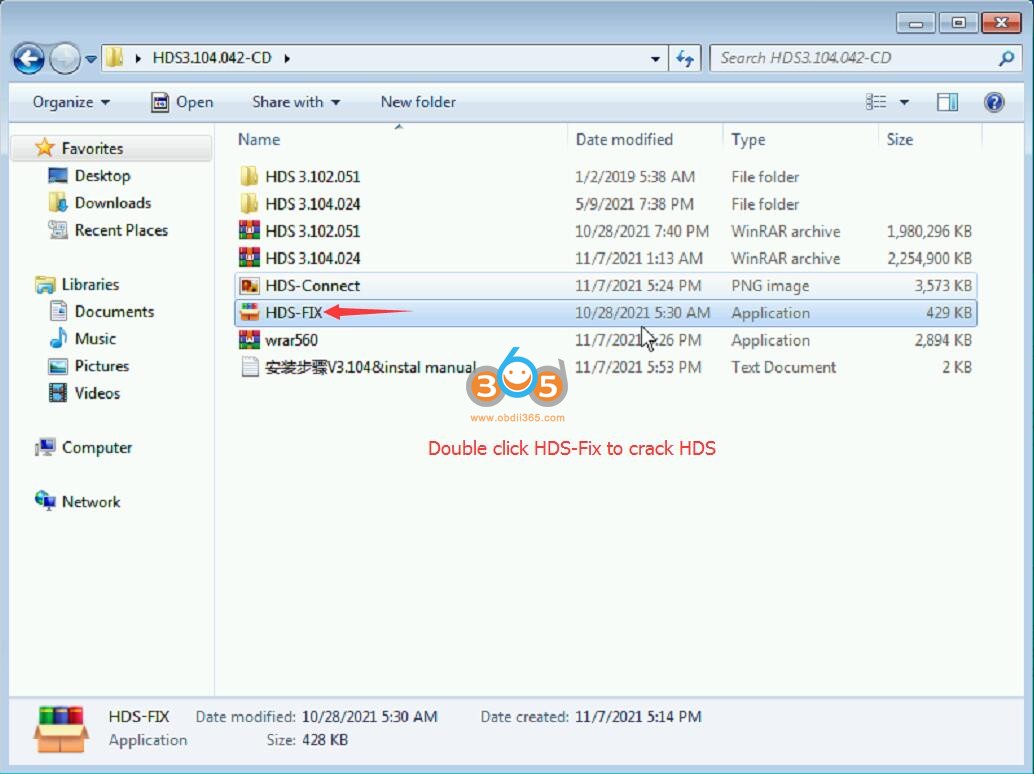
3.Double-click on the file HDS-FIX and the decrypted file will be automatically installed

install Honda HDS V3.104.024 software 5

4. Turn on the car ignition switch, connect the HDS HIM diagnostic tool to the vehicle OBD diagnostic port, and connect the COM port to the COM port of the computer.

If your laptop does not have a COM Port, use a USB to R232 serial converter which is included in the HIM pacakge.

install Honda HDS V3.104.024 software 6

5. Right click “My Computer” to open the device manager – port (COM) – change the serial port to COM1

install Honda HDS V3.104.024 software 7

install Honda HDS V3.104.024 software 8

install Honda HDS V3.104.024 software 9

6. Double-click the Honda Diagnostic System icon on the desktop and the diagnostic software will open for normal use.


Honda Diagnostic System HDS HIM clone any good?

Tuesday, May 17, 2022

Honda Civic 2007 DPF Regeneration by Honda HDS

 Honda Civic 2007 Diesel Particulate Filter (DPF) Regeneration by Honda HDS using Honda Him or J2534 interface. 

Honda Civic 2007 Diesel Particulate Filter Regeneration by Honda HDS 1

Honda Civic 2007 Diesel Particulate Filter Regeneration by Honda HDS 2

Honda Civic 2007 Diesel Particulate Filter Regeneration by Honda HDS 3

Honda Civic 2007 Diesel Particulate Filter Regeneration by Honda HDS 4

Honda Civic 2007 Diesel Particulate Filter Regeneration by Honda HDS 5